Free early access · v0.1.0 for Windows
Meet Kira.
A curious, warm little companion who moves onto your desktop and refuses to leave.
“oh, you're back. did you finish that thing, or are we pretending it doesn't exist?”
She remembers what you tell her. She notices when you go quiet. She talks back, out loud. And every day she understands you a little better. (Mostly.)
- Free during early access
- No account
- Works offline
- Windows 10 & 11
Thinks with the AI you choose
- Ollama
- Llama
- Gemma
- Qwen
- OpenAI
- Claude
- Gemini
Not just a chatbot
A personality, not a text box
She remembers you
Your name, your projects, the exam on Friday. Memories live on your PC, and you can read, edit or delete every one.
She talks back
Real-time voice replies with captions. Say “Hi Kira” and talk hands-free, or interrupt her mid-sentence.
She lives on your desktop
A 3D companion floating over your apps. She waves, wanders along the taskbar and dozes off when you ignore her.
She keeps your secrets
Run her fully offline with Ollama, or plug in your own cloud key. No Kira servers, no telemetry, ever.
See her in action
Company that stays out of your way
Click through a few moments with Kira. This preview is scripted so it runs in your browser; the real app streams from the AI you choose.
## Chapter 3 — Results
The model converges after ~40 epochs, but validation loss
plateaus early. Possible causes: learning-rate schedule,
small batch size, or data leakage between splits…
▍
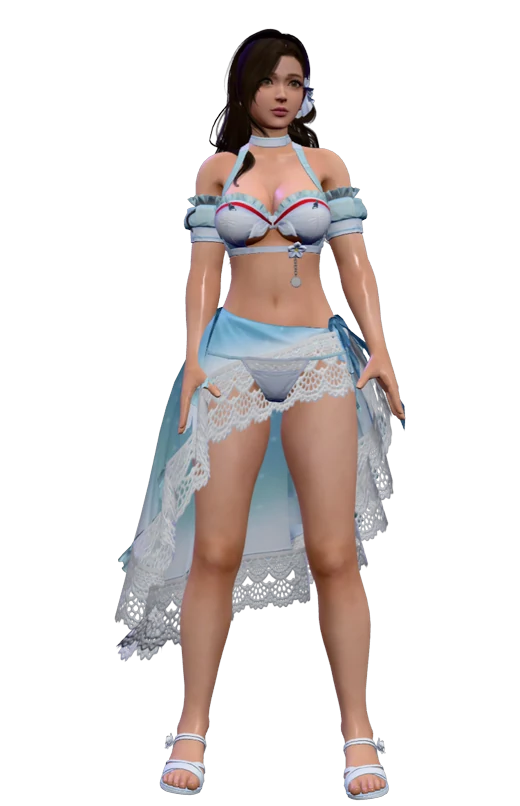
Kira floats over your apps
Small, always-on-top and draggable. With click-through on, clicks pass straight to the app underneath.
In the app: tray menu or Ctrl+Alt+L.
How it works
From download to hello in minutes
- 1
Download
A 6 MB installer for Windows 10 and 11. No admin rights, no account, no credit card.
- 2
Pick her brain
Private on your PC with Ollama (Kira picks the right model for your hardware), or your own cloud key.
- 3
Say hi
She appears on your desktop. Type, talk, or just say “Hi Kira”. That’s it.
The companions
Kira is the first.
More hand-crafted companions are on the way, each with their own look, voice and attitude. Kira just got here first, and she won't let you forget it.
- KiraAvailable
Warm, curious, a little dramatic.
- ???Coming soon
Still deciding how mean to be.
- ???Coming soon
Still deciding how mean to be.
Early access
Free while we build it together.
Kira is in early access. A limited group of early users gets the full app free, in exchange for honest feedback that shapes what she becomes.
₹0 / during early access
- Unlimited private chats with Kira
- Memory that actually remembers you
- Live 3D avatar that reacts while you talk
- Voice conversations, hands-free with “Hi Kira”
- Local AI with Ollama, or your own OpenAI, Claude or Gemini key
- Reminders, tasks and gentle check-ins
All we ask: tell us what you love and what breaks.
Early-access pricing can change later; we'll say so here first. Local AI costs nothing. If you pick a cloud provider, that provider bills your own account directly.

FAQ
Questions, answered
Is Kira free?
Yes, during early access. A limited group of early users gets the full app free in exchange for feedback. Pricing may change after early access, and this page will say so before it does. No account needed. Local AI through Ollama costs nothing beyond your electricity. If you choose a cloud provider, that provider bills your own account; Kira never resells or proxies AI usage.
Does Kira send my conversations anywhere?
In local mode, no: prompts go to Ollama on 127.0.0.1. In cloud mode, your messages and any context you include go directly from your PC to the provider you picked. Kira has no servers in between and no telemetry.
Why does Windows show a SmartScreen warning?
New installers that are not yet code-signed, or signed but without reputation, can trigger SmartScreen. The download page states the signing status of each build and lists its SHA-256 so you can verify the file.
Which local model should I use?
Start with Llama 3.2 3B on 8–16 GB machines, or Gemma 3 1B on older laptops. Gemma 3 4B understands screenshots but needs more memory. Kira suggests a model for your hardware; you decide.
Can Kira see my screen?
Only if you turn on screen help and press the capture button. You review each screenshot before it is sent, and in local-only mode it never goes to the cloud.
Does Kira blink or lip-sync?
Not yet. Her model has a full body skeleton but no face rig, so she shows feelings with body language instead: waving, leaning in, head tilts, dancing, and her jaw moves while she speaks.
She's waiting on your desktop.
Free during early access, private, and a little bit dramatic. Try Kira and tell us what you think.